.png?width=200&height=82&name=Beeple_Logo_Blue%20(1).png)
To access and manage your profile settings, follow these steps:
- Log in to the Collaborators App. (Click here if you need help)
- Navigate to the Main Menu: Click on the "hamburger menu" (three horizontal stripes) located in the upper left corner.
- Select 'My Profile'.
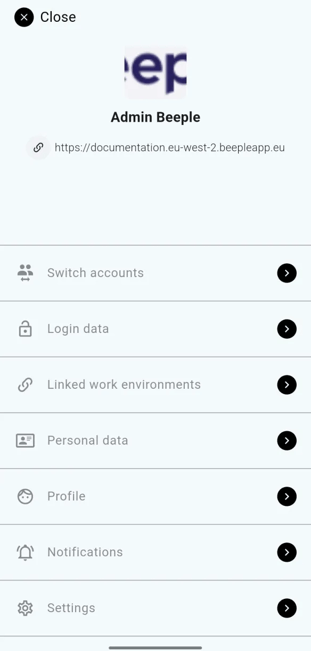
Once in 'My Profile', you will see several options:
- Switch Accounts: For users working with multiple agencies, this allows for easy switching between accounts.
- Login Data: This section contains your profile picture, email address, and password, along with options to deactivate or delete your account.
- Personal Data: Here you can manage your personal information, including address, bank details, and ICE (In Case of Emergency) contacts.
- Profile: If enabled by your organisation, you can edit your profile properties in this section.
- Notifications: Adjust the types of notifications you wish to receive.
- Settings: Change your preferred language within the app.
Important: Remember to click 'Save' after making any modifications to your profile.