.png?width=250&height=103&name=Beeple_Logo_Blue%20(1).png)
Go to “Campaigns” in the header menu
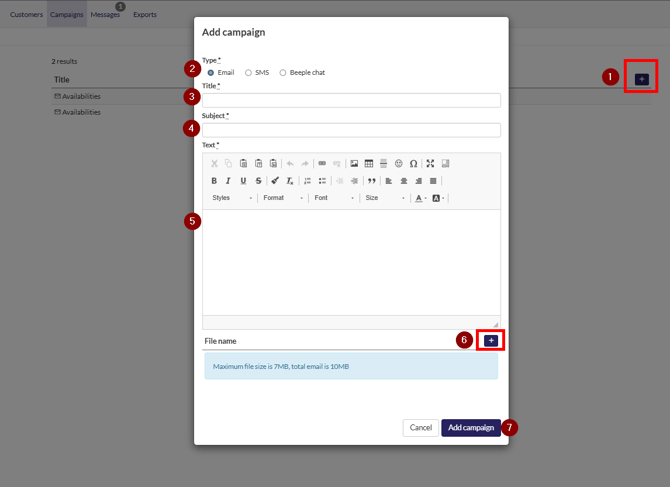
To create a new campaign:
- Click the "+" icon.
- Select the desired communication type.
- Enter a title.
- Enter a subject.
- Compose your message.
- Optionally, add a file using the "+" icon at the bottom.
- Select “Add campaign”
After adding, use the filters on the left to select the collaborator base. Once everything looks good, click "Select."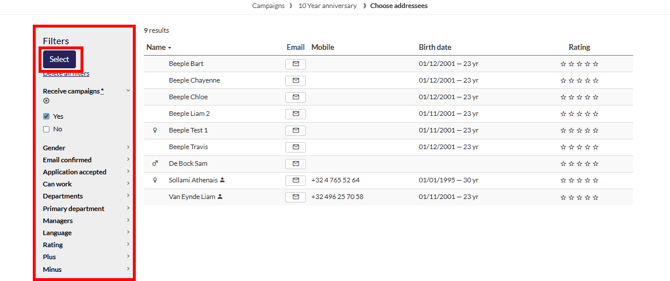
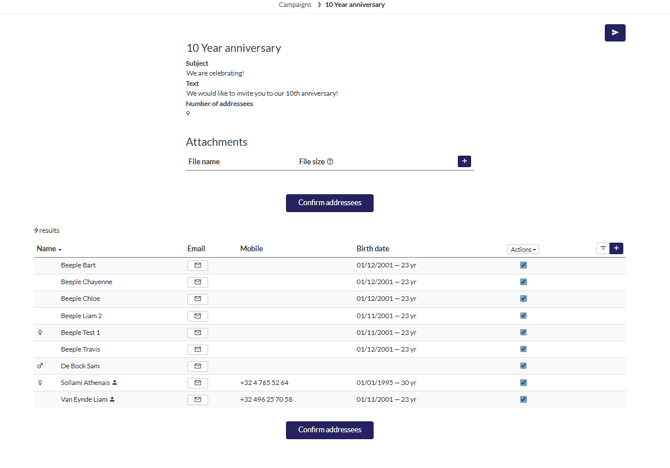
This is your final opportunity to review and modify your campaign before it is sent. Once dispatched, no further edits are possible.
You have the option to unselect recipients using the checkbox provided, allowing you to send to them at a later time if desired. Note: Make sure to click on “Confirm addressees”, if changes were made.
You can review the number of recipients in the top under “Number of addressees”