.png?width=250&height=103&name=Beeple_Logo_Blue%20(1).png)
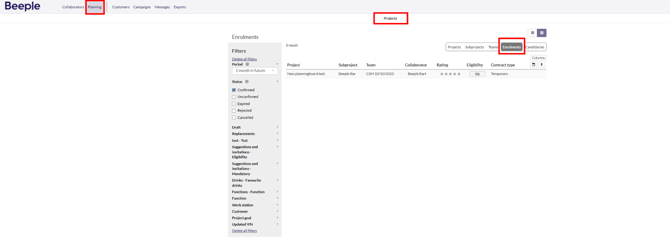
For all projects:
- Click on Planning
- Select Enrolments
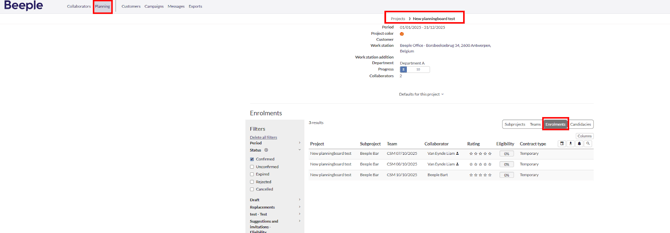
For a single project
- Click on Planning
- Select a specific project
- Click on Enrolments
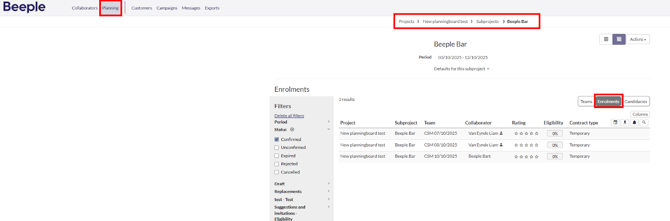
This way of working also applies to subprojects:
- Navigate to "Planning."
- Select a specific project.
- Choose the desired subproject.
- Click on "Enrolments."
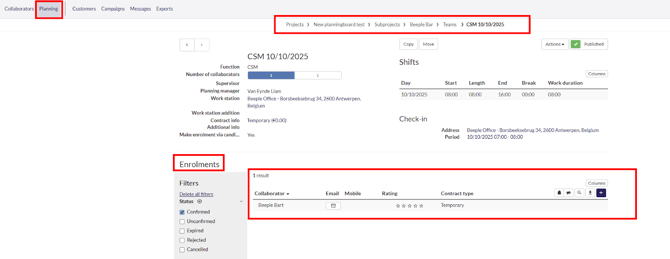
To view all enrolments on a team:
- Navigate to "Planning."
- Select a specific project.
- Choose the desired subproject.
- Select the relevant team
- Scroll down to the "Enrolments" section