.png?width=200&height=82&name=Beeple_Logo_Blue%20(1).png)
Logging In
Access Microsoft Azure Active Directory via this link: https://aad.portal.azure.com
Registering Your Beeple Application
- In the left-hand menu, select Azure Active Directory.
- From the second menu on the left, click App registrations.
- At the top left of the page, click + New registration.
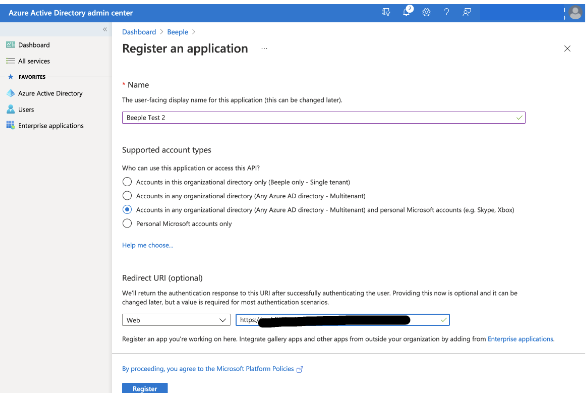
Registering an Application
- Name: [Your Company Name]
- Supported Account Types:
- Select (x) Accounts in any organizational directory (Multitenant) and personal Microsoft accounts.
- Redirect URI: [Web] [https://your.beeple.app.site.com/auth/microsoft/callback]
- The [Web] URI should be your Beeple app site URL followed by “/auth/microsoft/callback.”
- Click [Register].
Configure Additional Servers (Optional)
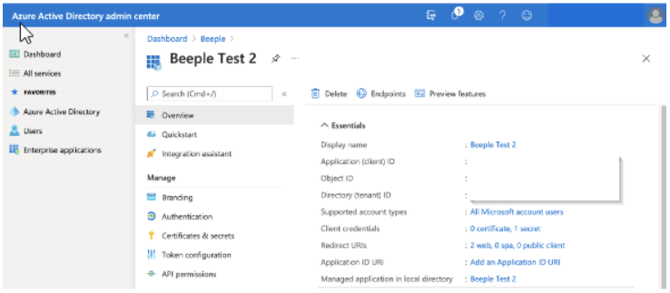
- If you have several servers which will share the same SSO app identity pool.
- On the left side right menu, click [Authentication]
- Web
- Redirect URIs
- Click [Add URI]
- http://localhost:3000/auth/microsoft/callback
- Click [Save] at the top of the panel
Create a Client secret
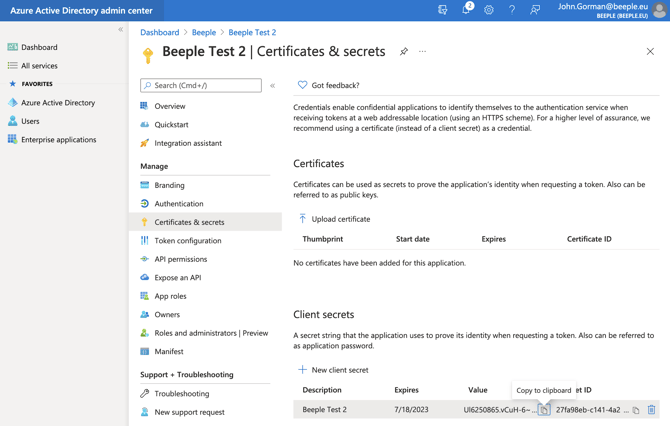
On the left side right menu, click [Certificates & Secrets]
Client secrets
Click [+ New client secret]
Add a client secret
Description: Your Company Name
Expires: [24 months]
Click [Add]
Your Company Name: Click the Value copy icon [[]
Copy to clipboard --> Copied!
Value: Ul6250865.vCuH-6~JK8lazkPs3a5kU_w9
Copy the Application (client) ID
On the left side right menu, click [Overview]
Copy the Application (client) ID: 4898c371-bc2b-4f22-b8b4-a09a658e22a6
Enable the Beeple External Identity Providers Module
1. Enable the External identity providers module.
Click Settings > Modules > External identity providers
Enable External identity providers [Yes] [Update settings]
2. Give your role permissions to the module.
Click Settings > Access and security
Click Role > Admin (your role name)
Enable all permission: External identity providers [Yes] [X] [X] [X]
[Update role]
Configure Beeple for Microsoft
Click Settings > Modules > External identity providers
Click [+] on the right side of the page.
Add new external identity provider
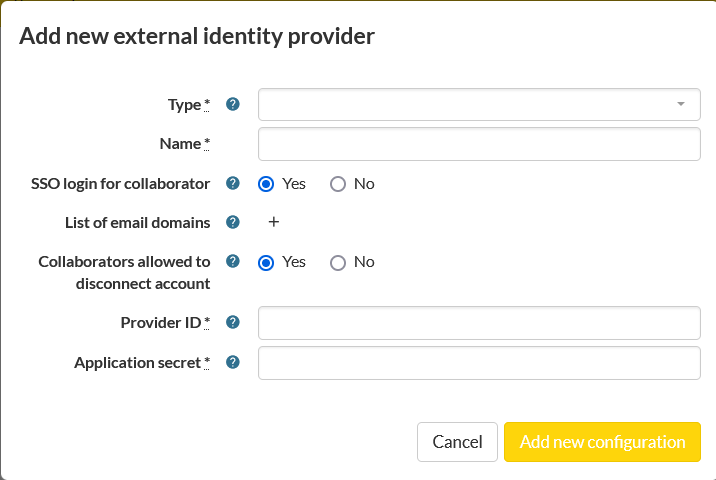
Please read the infotext by hovering over the blue question mark to know the exact meaning of every setting
Type: [Microsoft]
Name: free to choose e.g. MyCompany
SSO login for collaborator: Yes
List of email domains: free to choose depending on your usage e.g. MyCompany.be, MyInternationalCompany.com
Registration and login using SSO mandatory or Login using SSO mandatory: depending on your usage Yes or No
Email can be updated: depending on your usage Yes or No
Collaborators allowed to disconnect account: depending on your usage Yes or No
Provider ID: [your Microsoft Application ID]
Application secret: [your Microsoft Client Secret Value]
External tenant ID: [The Tenant ID from your organisation's Azure Active Directory] *
* You will need this if you selected “Accounts in this organizational directory only (Single tenant)” above. You can find your tenant id with this navigation:
Azure > All services > search [tenant status] > Tenant properties > Tenant ID
Click [Add new configuration]
Click [Test Microsoft] to see if it works!