.png?width=200&height=82&name=Beeple_Logo_Blue%20(1).png)
The 'Alerts' module enables you to send automated mass communications about new job opportunities to relevant collaborators. You can customize both the content of these messages and their sending schedule, utilizing one or more communication channels.
To set up the Alerts module, follow these steps:
- Click the gearwheel icon.
- Select "Settings."
- Scroll down to "Modules" and locate "Alerts."
- Ensure the "Alerts" module is active
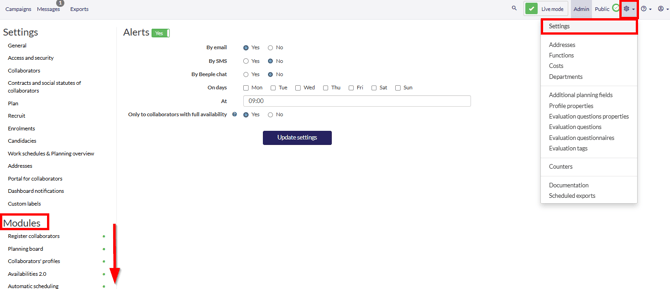
Configure your alert preferences by first selecting one or more preferred communication channels. Next, specify the days and approximate time for the alert to be sent. You also have the option to limit the alert to collaborators who are fully available.
Once done, select “Update settings” and alerts will start sending out on the selected days and times.