.png?width=250&height=103&name=Beeple_Logo_Blue%20(1).png)
You or your IT department will need to make these changes, which require access to your company's domain settings.
Canonical Name (CNAME)
To access the site via a URL, a CNAME record is required. A Canonical Name (CNAME) record is a resource record type that links a domain name as an alias to another domain, known as the 'canonical' domain.
Additionally, a DNS TXT record must be added. A TXT record, or text record, is a resource record type used to associate arbitrary text with a host or other name. This can include human-readable details about a server, network, data center, or other accounting information.
DomainKeys Identified Mail (DKIM)
A DKIM DNS record, which should be on a single line, needs to be added. DKIM is an email authentication method that helps detect email spoofing. It enables the recipient to verify that an email claiming to be from a specific domain was indeed authorized by the domain's owner.Sender Policy Framework (SPF)
An SPF DNS record needs to be added to prevent mail servers from ignoring emails sent from Beeple. An SPF record is a TXT record within a domain's DNS zone file. This TXT record specifies a list of authorized hostnames/IP addresses from which mail for a given domain name can originate.
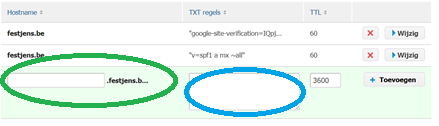
The image above illustrates a DNS board. Please note that some DNS management boards may pre-populate the domain name, in which case you can omit ".domainname". Always copy the text preceding "TXT" into the left field (highlighted green) and the text following "TXT" into the right field (highlighted blue).
Your Customer Success Manager at Beeple will provide you with the specific DNS settings during the creation of your Beeple site, as these settings are unique to each customer.